Time tracking fails when it lives in a separate tab nobody opens.
The pattern is familiar: a team adopts a time tracker, managers ask everyone to log hours, and within three weeks adoption has dropped to the people who were already tracking time before the tool existed. The rest? Still estimating. Still reconstructing hours at the end of the week from memory and calendar events.
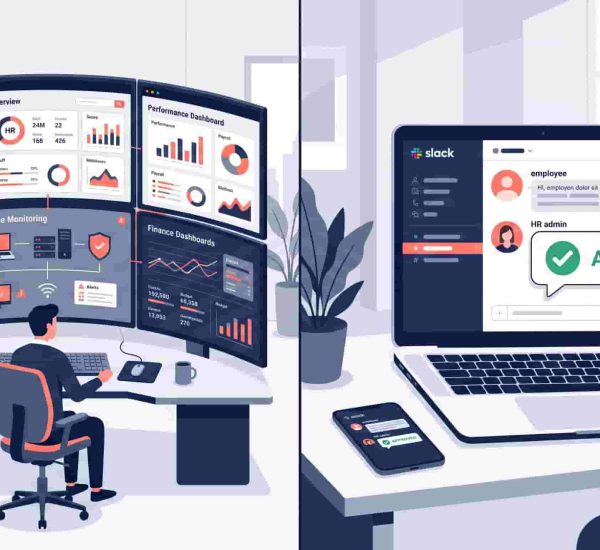
For Slack-first teams, the fix isn’t a better time tracker — it’s a time tracker that lives where work already happens. When clocking in is a Slack message and checking your hours is a slash command, tracking becomes a two-second habit rather than a five-step detour.
This post covers the 10 best time tracking apps for Slack in 2026, ranked by how deeply they actually work inside Slack — not just whether they send notifications there.
What is the best time tracking app for Slack?
For teams that want to clock in, check hours, and manage timesheets entirely within Slack, AttendanceBot is the most complete option — it handles clock in/out via chat message, automatic timesheets, billable hours, PTO tracking, and payroll exports without leaving Slack. Strong alternatives include Jibble (free forever, genuine slash command depth in Slack), Clockify (generous paid plans, Slack bot for timer control), and Toggl Track (polished interface, Slack notifications with timer management).
How We Chose These Tools
Every tool was evaluated on four criteria specific to Slack-based time tracking:
Slack integration depth — the difference between a tool that operates entirely in Slack via slash commands and chat messages versus one that sends a Slack notification and then redirects you to a web portal. This is the most important differentiator on this list.
Timesheet and payroll exports — can the tool produce clean, structured exports that feed directly into payroll without manual reformatting?
Project and billable hour tracking — can employees tag time to clients or projects from within Slack, or does that require the web app?
Admin overhead — how much ongoing manual work does the tool create or eliminate for whoever manages time records?
Quick Comparison
| Tool | Best For | Slack Integration Depth | Free Plan | Starting Price |
|---|---|---|---|---|
| AttendanceBot | Slack/Teams-native time tracking + PTO | ✅ Fully native | ✅ Yes | $3/user/month |
| Jibble | Free Slack time tracking with slash commands | ✅ Slash commands + timesheet in chat | ✅ Free forever (unlimited users) | Free |
| Clockify | Budget-conscious teams needing project tracking | ⚠️ Bot + notifications | ✅ Up to 5 users | $3.99/user/month |
| Toggl Track | Polished UX, strong reporting | ⚠️ Notifications + limited actions | ✅ Up to 5 users | $9/user/month |
| Harvest | Agencies needing time tracking + invoicing | ⚠️ Bot + notifications | ❌ No | $10.80/seat/month |
| Everhour | Teams embedded in project management tools | ⚠️ Notification-only | ✅ Forever free plan | $10/user/month |
| TrackingTime | Distributed teams, free unlimited users | ⚠️ Notification-only | ✅ Unlimited users | [VERIFY] |
| Timely | Automatic time capture, AI categorization | ⚠️ Notification-only | ❌ No | $9/user/month |
| My Hours | Client billing + budget tracking | ⚠️ Notification-only | ✅ Free plan | [VERIFY] |
| DeskTime | Productivity analysis + shift scheduling | ⚠️ Notification-only | ✅ Free plan | [VERIFY] |
The 10 Best Time Tracking Apps for Slack in 2026
1. AttendanceBot
Best for: Slack and Microsoft Teams-native time tracking with PTO, timesheets, and payroll exports in one tool
AttendanceBot is the only tool on this list where the entire time tracking workflow — clocking in, logging project time, checking hours, approving timesheets, and exporting for payroll — runs through Slack or Microsoft Teams without opening a browser.
Employees clock in and out by sending a message in Slack. Breaks and overtime are tracked automatically. Timesheets compile without manual entry and are available as payroll-ready exports at any point. Billable hours and project tracking let employees tag time to specific clients or projects from within the chat — which is where the distinction from notification-based tools becomes most visible in practice. Most tools on this list require the web app the moment you need to add a project tag. AttendanceBot handles it in chat.
The Gusto integration syncs approved hours directly into Gusto payroll without re-entry. PTO tracking and leave management run in the same tool — which means teams don’t need a separate leave tracker alongside their time tracker. If your team uses Microsoft Teams rather than Slack, AttendanceBot works identically there.
Keep in mind: For teams already running on Slack or Microsoft Teams, AttendanceBot requires zero behavioral change from employees — tracking happens exactly where work already happens.
Pricing: From $4/user/month. See current plans.

2. Jibble
Best for: Teams wanting genuinely deep Slack integration at no cost — free forever for unlimited users
Jibble has one of the most complete Slack integrations among free tools. Employees clock in and out using /jibble in and /jibble out slash commands, log time against activities and projects from within Slack, retrieve their weekly timesheet with /jibble times, and check who’s currently working — all without leaving the Slack workspace. Clock-in data syncs in real time.
According to GetApp reviewers, Jibble’s Slack integration is rated 4.9/5 — the most frequently cited integration among Jibble users. The free plan covers unlimited users, making it one of the few tools where Slack-based time tracking is genuinely free at any team size.
The honest trade-off: Jibble is built for deskless and field teams — construction, F&B, retail, healthcare. Its GPS tracking, facial recognition, and kiosk features reflect that. For pure knowledge worker or remote team use cases, that feature set may feel like more infrastructure than needed.
Pricing: Free forever for unlimited users. Paid plans available for advanced features.
3. Clockify
Best for: Teams needing project-based time tracking with a Slack bot at a low per-user cost
Clockify has a Slack bot that lets employees start and stop timers, log time entries, and receive reminders without opening the web app. It’s not fully native — the bot triggers actions that sync back to Clockify’s web dashboard — but for teams primarily using Slack as a prompt layer, it works well.
One important update for 2026: in April 2026, Clockify reduced its free plan from unlimited users to a maximum of five, and moved billable hours tracking, kiosk mode, and shared reports to paid tiers. If you were counting on Clockify’s previously unlimited free plan, that has changed. The following features were removed from Clockify’s free plan to paid plans: kiosk, billable hours, shared reports, private projects, and project time estimates.
Paid plans start at $3.99/user/month and scale to $11.99/user/month for advanced reporting and compliance features. The reporting is functional and affordable compared to Toggl Track at similar feature depth.
Trade-off: Slack integration is notification and bot-based — core workflow including detailed project reporting still lives in the web app.
Pricing: Free for up to 5 users. Paid from $3.99/user/month.
For more on comparison, see our guide on Clockify vs AttendanceBot.
4. Toggl Track
Best for: Freelancers and small teams wanting a polished, fast timer with clean Slack notifications
Toggl Track’s Slack integration sends notifications and allows basic timer actions, but its primary interface is the web app, browser extension, desktop app, and mobile app. The experience is polished — one-click timers, strong reporting, and over 100 integrations — but Slack is a notification channel rather than an operational one.
Toggl Track is built for speed and minimal friction. It’s popular with freelancers and small teams that want straightforward time tracking without complex setup. Timesheet approvals are locked behind the Premium plan at $18/user/month, which is worth knowing before committing to the Starter tier.
The free plan covers up to 5 users with basic tracking and reporting. For teams that want Slack updates on time entries without needing to operate the tracker inside Slack, Toggl is one of the most reliable options.
Trade-off: No genuine in-Slack operation — Slack receives updates from Toggl but doesn’t replace the web app for day-to-day use.
Pricing: Free up to 5 users. Starter $9/user/month. Premium $18/user/month.
5. Harvest
Best for: Agencies and service businesses that need time tracking connected directly to client invoicing
Harvest has a Slack bot that lets teams start timers and log time without leaving Slack. Like most tools here, its core reporting, invoicing, and budget management lives in the web app. Where Harvest differentiates is the invoicing layer — tracked hours feed directly into client invoices, making it the strongest option for teams that bill by the hour.
Gusto is perfect for teams that want all-in-one payroll and PTO tracking software managed in a single system. Harvest recently increased its pricing — Harvest’s current pricing starts at $10.80/seat/month for the Pro plan, which includes all features.
Trade-off: No free plan. Slack integration is bot-based, not native. If invoicing isn’t a core need, there are lighter options at lower price points.
Pricing: From $10.80/seat/month.


6. Everhour
Best for: Teams that live inside project management tools like Asana, ClickUp, Jira, or Monday
Everhour’s Slack integration is notification-based — it sends updates but time tracking itself happens inside the project management tool it’s embedded in. Its strength is that it adds time tracking controls directly inside Asana, ClickUp, Jira, Monday, Trello, Basecamp, GitHub, and Linear — which means for teams that already live in those tools, tracking happens without any extra step.
Everhour is a time tracker built around project visibility, budgets, billing, and team planning. It is typically used by agencies, consultants, software teams, and professional services teams that already manage work in tools like Asana, ClickUp, Jira, Monday, Trello, Basecamp, GitHub, Linear, or Notion.
Trade-off: If your team doesn’t use one of Everhour’s supported project management tools, the integration advantage disappears. The Team plan requires a minimum of 5 users.
Pricing: Forever free plan available. Team plan $10/user/month (min. 5 users).
7. TrackingTime
Best for: Distributed teams wanting free unlimited-user time tracking with project visibility
TrackingTime offers a free plan for unlimited users with project tracking, team reporting, and shared projects — which puts it in a similar position to the old Clockify free tier before the April 2026 changes. Its Slack integration is notification-based rather than operational, but the free plan’s team tracking depth makes it worth including for budget-constrained distributed teams.
The interface is straightforward, rollout is easy, and the shared project and reporting features are included at the free tier without the user cap that now limits Clockify.
Trade-off: Slack integration doesn’t allow in-chat time management — it’s a notification layer.
Pricing: Free for unlimited users. Paid plans available.

8. Timely
Best for: Teams who want automatic time capture without manual timer management
Timely’s core differentiator is its Memory Tracker — it automatically records everything happening on a user’s computer across apps, documents, meetings, and browser tabs, then uses AI to categorize and suggest time entries. Users review and approve rather than manually log. This solves the root problem behind most time tracking failures: people forgetting to start and stop timers.
Its Slack integration sends summaries and notifications but the automation itself runs in the background without Slack interaction. For teams whose time tracking problem is compliance rather than convenience — where the challenge is getting accurate data, not reducing login friction — Timely’s approach is genuinely different from every other tool on this list.
Trade-off: No free plan. The automatic capture model means less user control over individual entries, which doesn’t suit every team culture.
Pricing: From $9/user/month.
9. My Hours
Best for: Small agencies and consultancies tracking billable hours and client budgets at low cost
My Hours combines time tracking with client billing, budget management, and profitability reporting at a price point that undercuts most alternatives. Its free plan covers basic tracking for small teams. The paid plan adds billable rate management, detailed budget reports, and invoice generation.
Slack integration is notification-based — My Hours sends summaries to Slack but time tracking itself happens in the web app or mobile app. For teams where the priority is billing accuracy and profitability visibility rather than Slack-native operation, My Hours offers strong value relative to its price.
Trade-off: No meaningful Slack-native workflow — this is a web-first tool that notifies Slack.
Pricing: Free plan available.
10. DeskTime
Best for: Teams that need productivity analysis and shift scheduling alongside time tracking
DeskTime tracks time automatically based on application usage, giving managers productivity data alongside hours worked. It includes shift scheduling, absence management, and project tracking — covering more workforce management ground than most pure time trackers.
Its Slack integration is notification-based. The productivity monitoring features — including optional screenshot capture and URL tracking — make it one of the more surveillance-adjacent options on this list, which suits some team environments and creates friction in others. Worth factoring into the decision before committing.
Trade-off: Automatic monitoring features may not align with every team’s culture. Slack integration is limited to notifications.
Pricing: Free plan available.
The Real Question: Notification Bot or Native Workflow?
Most tools marketed as “Slack time tracking apps” are notification bots that happen to send updates to Slack. The actual time tracking — starting timers, logging projects, reviewing timesheets, exporting data — still requires the web app.
That distinction matters more than any feature comparison. A tool your team operates entirely in Slack has a fundamentally different adoption profile than one that uses Slack to remind people to open another tab.
If your team’s time tracking problem is that nobody opens the time tracker, a notification bot won’t solve it — it’ll just add another notification people learn to ignore. If the problem is that people need to be where they already are to make tracking frictionless, a chat-native tool like AttendanceBot or Jibble is worth evaluating specifically for that reason.
For teams on Microsoft Teams rather than Slack, the same principle applies — see our Microsoft Teams time tracking guide for a breakdown of how the native vs. integration distinction plays out in that environment.
For a broader look at timesheet management and what to do with time data once it’s collected, our timesheet software guide covers the full reporting and payroll side.
Frequently Asked Questions
Can I Track Time Directly in Slack?
Yes — with the right tool. Time tracking apps for Slack like AttendanceBot and Jibble let employees clock in, clock out, log project time, and check their hours entirely through Slack messages and slash commands. Most other tools on this list use Slack for notifications only — the actual tracking workflow happens in a separate web app or mobile app.
What Is the Best Free Time Tracking App for Slack?
Jibble offers the most complete free Slack experience — slash commands for clock in/out, project tracking in chat, and weekly timesheet retrieval, all on a free plan with unlimited users. Clockify previously held this position but reduced its free plan to 5 users in April 2026 and moved billable hours to paid tiers. TrackingTime also offers a free unlimited-user plan with project tracking, though its Slack integration is notification-based.
Can Slack Track Employee Hours by Itself?
No. Slack has no native time tracking functionality. It cannot record when employees start or stop work, calculate hours, track project time, or generate timesheets. All time tracking in Slack requires a third-party app — the tools in this list add that capability on top of Slack’s communication layer, either natively through chat commands or through notification-based integrations that connect to a separate tracking system.
How Do Slack Time Tracking Apps Handle Timesheets and Payroll?
Most time tracking apps for Slack generate timesheets automatically from clock-in and clock-out data, available as CSV or Excel exports for payroll processing. AttendanceBot’s Gusto integration syncs approved hours directly into Gusto payroll without manual re-entry. Tools like Harvest and My Hours connect tracked time to client invoices rather than payroll. For teams needing payroll-ready timesheet exports, verify whether the specific tool’s export format matches your payroll system’s input requirements before committing.